 ShiftDrop
Form photos
The exact pixels and KB an exam or job form asks for. Frame it yourself, then get a JPEG inside the limits. Limits stay editable, because forms change them.
How it works
Make it fit
Slices like WhatsApp, Email and Under 100 KB find the best quality that still fits. An example; real sizes depend on the photo.
And it keeps going
The exact pixels and KB an exam or job form asks for. Frame it yourself, then get a JPEG inside the limits. Limits stay editable, because forms change them.
Originals are never touched. Change your mind on a Mac or Windows PC and the result goes to the Trash, where you can still get it back.
See the real frames while trimming a video. Merge, split, rotate and compress PDFs. Turn a PDF into an editable Word file.
Open password-protected PDFs and ZIPs, remove a PDF's password, or lock a ZIP with one. Passwords are never stored.
Drop a folder of up to 200 files. A damaged file gets its own error, and the rest still finish.
The app follows your device's language, down to the reason a file couldn't be converted.
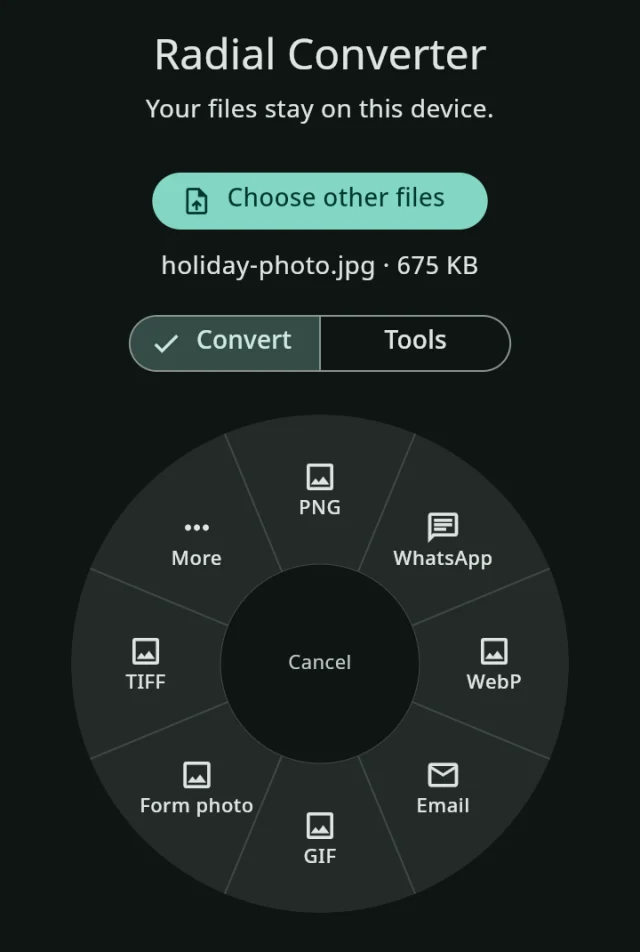
No Shift-drag on your device? The same menu works in the window.
What it converts
Privacy
Nothing is uploaded, because there's nowhere to upload it to. No account. No ads. No tracking.
The app doesn't ask for the permission, so Android itself stops it. Our builds fail if that ever changes.
Its page carries a security policy that lets it connect only to itself.
No fonts, scripts or counters from other companies. Open your browser's network tab and look.
Read the privacy policy, or the source.
Download
In beta: please tell us what breaks.
macOS 12 or newer, Apple Silicon or Intel
DownloadFirst time: macOS warns the app isn't from an identified developer. Go to System Settings, Privacy & Security, and choose Open Anyway.
Windows 10 or newer, 64-bit
InstallerOr the portable zip.
First time: if Windows doesn't recognise the app, choose More info, then Run anyway. The newest and least tried of the four.
Android 7 or newer
For most phonesOlder phone? The larger APK runs on all.
First time: Android asks you to allow installing from your browser. Then share any file to the app.
Nothing to install
Open the web appOn an iPhone: open it in Safari, tap Share, then Add to Home Screen. It then works offline.
All files and release notes, with checksums to check a download.
Yes. No paid version, no ads, no account. The code is open source under the Mozilla Public License 2.0.
Macs and Windows PCs warn about apps that haven't paid for or been granted a signing certificate, and this one doesn't have one yet. The steps above get past it, and the checksums let you confirm you have the real file.
Yes. The apps never need it, and the web app works offline once it has been opened once.
Very large videos work, as they're read piece by piece. Pictures, PDFs and archives work in memory, up to 1 GB across a job.
PDF to Word keeps text and headings, but not yet pictures on text pages, tables or exact layout, and scans can't be edited. Locked 7z and RAR files and RARs in several parts can't be opened. Passwords can be added to archives, but not to PDFs.
It will have the size the form asks for, but forms can refuse a photo for other reasons, and their rules change. Always check your form's own notice. The app only crops and scales.
Please open an issue on GitHub.